
CSS Product Content (33)
Upgrade your Hewlett-Packard 1100 LC (HPLC) to new Chemstation, a modern PC and Microsoft Windows 7.
Upgrades for your 1100 LC
Our hardware upgrade kits include all the parts you need. Provide your own compatible PC or buy one of our PC bundles.
Have your older HPLC running on a screaming fast PC in less than a couple of hours. Bring your perfectly good 10 to 15 year old LC into the modern era and allow it to run another five to ten years. Let us prepare a custom quote for you today !


LCMS Products
CSS Analytical has built our product list over the years to include items for the Liquid Chromatography Mass Spectrometry (LCMS) technique. The liquid phase of the mass spectrometry business is highly technical and specific in its needs. CSS Analytical strives to stay on the cusp of this industry.
LCMS Products that we offer:
We do On-Site repair. Call or email us for a quotation. Our best means of repair for you is our Depot Repair Service. With this service you ship all or part of your instrument to our factory. We'll check it out here and report back to you with an estimate before we do anything. We can also help you with DIY instrument repair.
CSS Analytical offers FREE phone support via our toll free "800" number to our current warranty customers and to customers with service contracts. We offer limited FREE email support. Just send you questions to us, we're very good at responding to email questions quickly.
From assemblies to refurbished boards and even complete machines, we have all the spare parts you will need to keep your instrument running for many years.
 Nano Spray Interface for the Thermo LTQ - Two unique nano spray interfaces for the Thermo LQT mass spec line.
Hydrogen Dueterium Exchange (HDX) - HD Exchange system for proteomics characterization. Fully automatic and priced for the small lab.
1100 LC Upgrades - Lan cards, new Chemstation and new PCs with Windows 7.
1100 LCMSD Upgrades - Lan cards, new electronics boards, Chemstation and new PCs.
HDX-MS (hdx mass spec) a valuable tool for characterization of proteins and peptides.
An affordable automated Hydrogen Deuterium Exchange (with mass spectrometry component HDX-MS) solution for the budget conscious lab. Label, quench, digest and separate all in one convenient package and all in-line. Two thermo electric cooler zones - one for labeling and one for quenching. HPLC pump heads replace typical syringe pumps for plenty of pressure. Quick reaction times - under 1 second. Software control gives the user easy control over experimental conditions. A perfect product for the university Core Lab or start up, delivered by CSS Analytical and priced at under $50k.
Theory of Operation
The system consists of two independently chilled chambers. Within the coolers are 4 HPLC valves, 3 HPLC pump heads (and solvent reservoirs), two mixing tees, a trap, pepsin column and analytical column. A line comes in to the analytical valve from your binary pumping system and a line exits the cooler from the analytical column to your mass spec.
A simplified system diagram is shown below. What makes this a simplified diagram is that we left out the four HPLC valves that change the flow path. HPLC pumps are depicted as syringes.
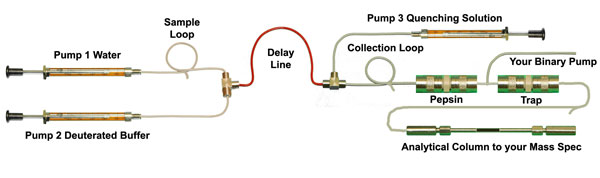
Sample is loaded onto a loop, the sample valve switches and the sample and D2 buffer are pushed into a mixing tee at a dilution rate specified by the user. After mixing, the buffered sample passes through the delay line for a defined amount of time, "experimental time". This time determines the amount of exchange or labeling. Quenching occurs at the quenching tee and then the sample is collected on the collection loop. The sample prep valve switches and the sample is pushed off the collection loop by the same quenching solution and passes through the pepsin column and onto the trap (to waste). The sample prep valve switches back and the trap is washed by your binary pump to waste instead of the mass spec. The analytical valve is switched, a contact closure starts your mass spec and the gradient program on your binary pumping system begins. And finally, the trapped and cleaned sample is pushed off the trap by your binary pump, with your programmed solvent gradient and onto and through the analytical column to your mass spec.
Hardware Description
System hardware consists of two chambers with independently controlled thermo-electric chillers capable of maintaining the enclosures and contents to zero degrees centigrade. Three HPLC pumps and four HPLC valves (6 port, 10 port, 6 port, 6 port). A Pepsin column, Trap and Analytical column are provided by the customer. Contact closure for remote start of your mass spectrometer is included. All coolers, pumps, valves and contacts are controlled by custom software and a simple user interface. The boxes require 18” x 14” of bench space. A power supply require additional space under the bench. The software can be loaded onto your mass spec PC or onto a separate PC so that the unit can be mobile and used on different mass specs. A custom cart with multiple shelves is ideal but not included.
Software Description
The software interface amounts to one compiled program consisting of three “tabs”, or pages.
The Configure Tab is where the user sets up the system with various system variables like the sample loop and collection loop volumes and the length and diameter of the delay line. Other constants like mass spec run time and the specifics on purging the system are entered here as well.
The Manual Control Tab is where the user has complete control of all three pumps and four valves. The pumps are “homed”, flushed and filled using this page in order to get ready for a run or series of runs.
The Run Control Tab is where the experimental variables are entered like the two dillution factors and the age of the reaction or labeling time. The “calculated” variables, i.e. pump flow rate, pumping and valve switching times are calculated and displayed. The experimental run is started and the status is monitored on this page.
The software is customizable to user preferences. k
Which Smartcard do you have ?
There are three versions of Smartcard 2.
SmartCard 2 has 6 memory Sims, 4 on the bottom and 2 on the top.
SmartCard 2+ has 3 memory Sims, 1 on the bottom and 2 on the top.
SmartCard 2++ has 1 memory sim on the bottom.
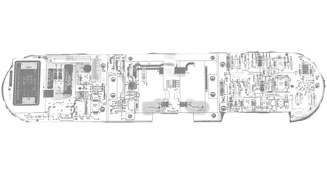
The SmartCard is located on the left hand side of the MSD, under the outer sheet metal cover and under the aluminum safety cover(s). The SmartCard is the board on the left, the Main board is the board on the right.
If your Smartcard is not pictured here (one of three) then you likely have the Smartcard I which is too old for any of our Window 7 or Windows XP Upgrades.
The original SmartCard 2 (pictured above on the far left) is the first Smartcard with added memory in the form of Sim cards. Two (2) on the top edge and four (4) on the bottom edge of the board. The Smartcard 2++ is the newest and last SmartCard 2 before Agilent migrated to the SC 3, with Lan not HPIB. Turns out that the memory (in the data buffer) of the original SC 2 is much smaller and has a much slower access time than either of the two newer Smartcards.
Our Win 7 upgrades will work with all three Smartcard 2s. It seems though, that the system appreciates faster access to the Smartcard Data Buffer - so the first gen Smartcard II are not as reliable (depending on acquisition parameters) as the 2nd and 3rd gen Smartcard 2. If you run samples via a long sequence list your system will perform better with the newer Smartcard 2+ or 2++. If you run samples one at a time, or with a sequence of only a few samples - you will likely be just fine with the original Smartcard 2.
Contact us directly if you have any questions.
Windows 7 Chemstation Upgrades
Data System Upgrades for HP 5971, HP 5972 and HP 5973 Mass Spectrometer, Agilent 6890 GC and GCMS.
CSS Analytical Eighty-X Win7 (c) for all of your Hewlett-Packard, HP and Agilent GC Mass Spectrometer Systems. Upgrade your old, out-of-support GC/MS system to a modern PC with Windows 7 (XP Pro still available ... for now) and Modern Chemstation(c).
Here's how our upgrade package works:
The first Dos Windows based Chemstation came out in the early 1990s. Every time Microsoft rolled out a new Windows product, Hewlett-Packard ("HP" back then) would revise their Chemstation software. And on each major revision, they took the opportunity to remove support for older MS systems. This was their way of persuading you to "retire" your old mass spec system and buy a new one.
Our upgrade products follow two different paths. 1. For currently UN-Supported instruments - that is instruments (GC MS systems) that HP/Agilent will no longer support.... 5970s, 5971s, 5972s, 5988s, 5989s. And 2. For currently Supported instruments.... 5973s, 6890s and newer.
For currently Un-Supported Instruments (HP 5970, 5971, 5972, and 5973 soon):
Since 1990 we have been studying and modifying the HP/Agilent Chemstation and every time they changed it - we'd put the support for old mass specs back in place. We've have had a very successful business for 23+ years. The "hacks" that we add to Chemstation are necessary for you to run your mass spec on Windows 7 are ours and can be found NO WHERE ELSE in the world (sole source justification). Over the years, some of our competitors copied our work but when we went to the XP upgrade we engaged an Anti Piracy Key and since then it has held up perfectly, keeping our IP safe. Our upgrade is distributed on our own CSS built preloaded PC with backup image and emergency boot/recovery CD Rom. Our quality PC will be pre-configured, ready to plug in and deploy. In some (vary rare) cases, your GC-MSD may need newer boards. Contact us for details if you have a very old MSD.
For currently Supported Instruments (HP / Agilent 5973):
We have a package of easy to follow instructions and hardware that Agilent no longer offers in "kit" form. Go directly to our 5973 Lan Upgrade page and our 6890 Lan Upgrade page.
Why make this investment ?
Upgrade your old, out-of-support GCMS systems to a modern PC with all the bells and whistles ... one (or more) big Hard Drives, a DVD burner, lots of USB ports, modern Chemstation and Microsoft Windows 7. Have your older HP MSDs running on a screaming fast PC in less than an hour. Bring your perfectly good 10 to 15 year old mass spectrometer into the modern era and allow it to run another five to ten years.
All for a fraction of the price of a new system.
Install the upgrade yourself or ask for on-site installation.
Let us prepare a custom quote for you today !
Available for HP 5971, 5972, 5973. Also for 5989, 5970 & 5988.
Chemstation(c) is a copyright of Agilent Technologies Inc.
TrueHED(c) - High Energy Dynode
What is the TrueHED system ?
The CSS Analytical Co Inc. High Energy Dynode (HED) is a sensitivity enhancement product, designed as an after market addition to existing Agilent 5972, HP 5972, and HP 5971 Mass Spectrometers. The CSS Analytical TrueHED© product consists of three components: the Electron Multiplier unit, the HI Volt Box and new Chemstation macros. The Hi Volt box is small and rests on the top of the instrument case. The Hi Volt box obtains its power from the MSD and communicates with the Chemstation via the “Accessory Control” bus. The electron multiplier unit is an assembly very similar to the unit that comes standard on the MSD, except re-designed to provide new features which are the heart of the HED system. The Chemstation macros are basically modifications to the Manual Tune Menu which allows for the HED to be turned on and off. The expected improvement in true signal intensity is from 3x, to as much as 30x or more depending on the m/z of the ion being detected, with the same, or better signal-to-noise ratio. This improvement occurs over the entire mass range but is most pronounced for high-mass ions. Thus, if you can see 20x more signal from the same concentration of compound, without a reduction in signal-to-noise ratio, it stands to reason that you can reduce the amount injected for a lower Limit of Detection (LOD).
Why make this investment ?
The CSS Company High Energy Dynode (HED) detector system improves the sensitivity of a quadrupole mass spectrometer by increasing the efficiency of ion detection. A few years ago, you wisely invested in your HP brand 5971 and 5972 GC/MS. It has given you many years of service with little trouble. Now, its getting older and you are faced with the same old decision: Buy a new model or stay with the one you have ? Now, you have another choice !
CSS Analytical Co. Inc. has been offering data system upgrades since 1990 and for the value, nothing or no one has offered anything better in all these years. With our Eighty-X© Mass Spec Upgrades you have been able to keep your MSD up to date with the most current Microsoft Operating System, and Chemstation available. You know how strong your MSD is. You know that your mass spec should be able to run for at least another 5 years. CSS Analytical wants to offer you yet another outstanding upgrade product to help this become a reality. Upgrade your HP 5971, Agilent 5972 or HP 5972 MSD with the CSS Analytical TrueHED© and realize sensitivity that you’ve never seen before !
Send us your working top board, manifold plate, source and electron multiplier. We'll use your parts, with just a few minor modifications. We'll mount our HED then tune it to your existing quads and source, burn it in and test, then send it back ready to drop in and run. For less than HALF the price that you might think !
Let us help you keep your 5971 and 5972 running another 5+ years.
Here's how it works:
The CSS Company High Energy Dynode (HED) detector system improves the sensitivity of a quadrupole mass spectrometer by increasing the efficiency of ion detection. The standard electron multiplier of the mass spectrometer has three main elements: an iris, a deflector, and an electron multiplier horn.
As with all detector systems the ion starts in the ion source and is "repelled" by the repeller into the quadrupole. The repeller voltage is small (5 to 20 volts) and is there to accelerate the ions into the quadrupole where they will be filtered. Since the voltage (and therefore effective force) of the repeller is constant for any given set of ions, the same momentum is imparted into all ions, regardless of size. Since momentum is equal to mass times velocity, the smaller masses will have a greater velocity and the heavier masses will have a slower velocity. This velocity of the ion then defines it's kinetic energy ( ½ mV*2). Ions with higher velocities will have much more kinetic energy than ions with slower velocity.
This detection scheme makes use of relatively low voltages applied to the iris lens and x-ray plate which forms a lensing system. This lens system focuses the ions into the electron multiplier horn with what ever energy they have when they arrive. Unfortunately as the mass of the ions increase they generate a much lower signal as they strike the electron multiplier horn. This is due to their lower kinetic energy.
In contrast, the CSS Company HED has a new electron multiplier detector, with improved ion optics (lens system) and high ion-collection efficiency. After all, once the ions are made in the source, we can't make any more on the way to the detector improvements must come by doing a better job of detecting the ions that are there. During positive ion mode, a very large negative electric potential is placed on the "High Energy Dynode" plate, typically 20x to 100x the magnitude of the potential on the original x-ray plate. This large voltage of opposite polarity will attract the positive ions toward the dynode plate with great force. This process accelerates the velocity of the ion and hence dramatically increases the kinetic energy. These highly accelerated ions will now collide with the dynode plate and generate a shower of "secondary" ions and electrons that will recoil and are focused into the electron multiplier and thus produce substantially more signal. Although some additional noise is also generated by this process, the true signal of the ion being detected increases even more rapidly resulting in higher signal to noise ratios.
CSS Analytical can upgrade your older HP 5971 and HP 5972 with a 10kv High Energy Dynode (HED) just like the modern Agilent 5973 MSD and Agilent 5975 MSD. More signal, more sensitivity, lower Electron Multiplier voltage. Simple upgrade. Priced right. Make your HP Agilent 5972 (and HP 5972) MSD more modern and up-to-date and live many more years.
HP 5971 MSD Upgrades
Data System Upgrades for Agilent 5971 MSDs, also for HP 5971, HP 5972 and HP 5973 Mass Specs.
CSS Analytical Eighty-X PX (c) for all of your Hewlett-Packard, HP and Agilent GC Mass Spectrometer Systems. Upgrade your old, out-of-support GC/MS system to a modern PC with Windows 7 (XP Pro still available) and Modern Chemstation(c).
Here's how our upgrade package works:
The first Dos Windows based Chemstation came out in the early 1990s. Every time Microsoft rolled out a new Windows product, Hewlett-Packard ("HP" back then) would revise their Chemstation software. And on each major revision, they took the opportunity to remove support for older MS systems. This was their way of persuading you to "retire" your old mass spec system and buy a new one.
Since 1990 we have been studying and modifying the HP/Agilent Chemstation and every time they changed it - we'd put the support for old mass specs back in place. We've have had a very successful business for 20+ years. The "hacks" that we add to Chemstation are necessary for you to run your mass spec on Windows XP Pro are ours and can be found NO WHERE ELSE in the world (sole source justification). Over the years, some of our competitors copied (and stole) our work but when we went to the XP upgrade we engaged an Anti Piracy Key and since then it has held up perfectly, keeping our IT safe. Our upgrade is distributed on our own installation CD ROM - making it a single CD, straight forward, EASY, and repeatable installation. When you use our software to "configure" your mass spec, you must provide a valid Chemstation license number - putting the license issue on you, the end user, and keeping CSS Analytical out of the software piracy business. Our easy to install kit includes a compatible HPIB board for your PC, an installation CD ROM and easy to follow instructions.
In some (vary rare) cases, your GC-MSD may need newer boards. Contact us for details if you have a very old MSD.
Why make this investment ?
Upgrade your old, out-of-support GCMS systems to a modern PC with all the bells and whistles .... a DVD burner, Flash drive, modern Chemstation and Microsoft Windows XP. Have your older HP MSDs running on a screaming fast PC in less than an hour. Bring your perfectly good 10 to 15 year old mass spectrometer into the modern era and allow it to run another five to ten years. All for a fraction of the price of a new system.
Provide your own compatible PC or buy one of our bundles. Install the upgrade yourself or ask for on-site installation. Let us prepare a custom quote for you today ! Fill out our Free and Easy Quote Form Here.
Available for HP 5971, 5972, 5973. Also for 5989, 5970 & 5988.
Chemstation(c) is a copyright of Agilent Technologies Inc.
Agilent MSD Upgrade
CSS Analytical Eighty-X PX (c) Bare Bones Lan Upgrades for your HP 5973 MSD and Agilent 5973 MSD Gas Chromatograph Mass Spectrometer Systems. Upgrade your Agilent MSD systems to a modern PC with full network connectivity and the very latest Agilent Chemstation.
History of the Agilent 5973 GCMS System:
First was the 5973A, then 5973 Inert, then 5973N and now the 5975 MSD. In the early days, the 5973s were still under the HPIB protocol. That meant that the old tried-and true HPIB boards and cables were an integral part of the system. HPIB was rather difficult to install but once in place was always ROCK SOLID ! This of course required an HPIB board in your PC, an HPIB board in your 6890 Gas Chromatograph and Autosampler and also an HPIB board in your Mass Spectrometer.
When networking became common in the office, it naturally extended itself to the Analytical Laboratory. For much of the same reasons that "network printers" became popular - so did "network instruments". Here were the factors that drove the change: Ease of set up and a common environment (IT personnel with Lan experience are easy to find... HPIB experience not so easy to find). Communication by Ethernet is much faster and reliable. Lan instruments can be MUCH FURTHER away from the PC. How many labs have instruments on one bench, but the PC on another bench across the isle or across the room ? Ethernet made that EASY ! Ethernet cables are much easier to route and much neater. Then there is the dream of WEB BASED instruments. Not such a dream any more. With the proper software and permission - I can run your instrument from far, far away (individual runs and sequences). I can connect to your instrument and help you troubleshoot any issues you may have. And even run remote diagnostics and fix your instrument over the web.
With the advent of the 5973N ("N" stands for network) the instruments became LAN instruments. The PC, the Agilent 6890N and the Agilent MSD all came with Ethernet cards inside and included a Hub and Cat 5 cable.
Here's how we do the Upgrade:
We basically put Lan hardware into your GC and MSD. We advise you how to configure your Network card inside your PC, help you load new Chemstation software and make connections via a hub and Cat-5 cable. Easy !
Why make this investment through CSS Analytical ?
Why ? You can't get this upgrade from the manufacturer - Agilent Technologies Inc., any more !
Agilent used to sell this upgrade, but a few years back discontinued this upgrade package and now ONLY offers you a High Performance Upgrade package which costs about $15,000.00 With the high performance upgrade you get faster scan speeds and the ability to SIM and SCAN during the same acquisition. For some, this is important - but FOR MOST, it is entirely unnecessary. If your 5973 is sensitive enough and performs the job you need it to do, why spend so much money when all you need is new Chemstation and LAN connectivity ?
Upgrade your 5973 Gas Chromograph Mass Spectrometer systems to a modern PC with full network connectivity, a DVD burner, Flash drive, Windows XP Pro or Windows 7 and the very latest Agilent Chemstation. Do it now while these parts are still available !
Our easy to install kit includes a new Multi-IO LAN card for your 5973, Lan card for the HP 6890, Hub, Cat-5 Cables and easy to follow instructions. Have your older HPIB based 5973 6890 running on a screaming fast PC in less than a couple of hours. Do it now for a price that is less than HALF of the alternative package. Bring your perfectly good 5+ year old Mass Spectrometer into the modern era and allow it to run another ten to fifteen years.
Available for HP 5973 and Agilent 5973 currently running under the HPIB protocol.
Provide your own compatible PC or buy one of our bundles. Install the upgrade yourself or ask for on-site installation. Let us prepare a custom quote for you today !
Request more information here.
Chemstation(c) is a copyright of Agilent Technologies Inc.
Agilent 6890 GC Upgrades
CSS Analytical Eighty-X PX (c) Bare Bones Lan Upgrades for your HP 6890 & Agilent 6890 GC Systems..
Upgrade your 6890 GC systems to a modern PC with full network connectivity and the very latest Agilent Chemstation.
History of the 6890 GC System:
First there was the 6890A. In the early days, the 6890s were still under the HPIB protocol. That meant that the old tried-and true HPIB boards and cables were an integral part of the system. HPIB was rather difficult to install but once in place was always ROCK SOLID ! This of course required an HPIB board in your PC, and an HPIB board in your GC and Autosampler.
When networking became common in the office, it naturally extended itself to the Analytical Laboratory. For much of the same reasons that "network printers" became popular - so did "network instruments". Here were the factors that drove the change: Ease of set up and a common environment (IT personnel with Lan experience are easy to find... HPIB experience not so easy to find). Communication by Ethernet is much faster and reliable. Lan instruments can be MUCH FURTHER away from the PC. How many labs have instruments on one bench, but the PC on another bench across the isle or across the room ? Ethernet made that EASY ! Ethernet cables are much easier to route and much neater. Then there is the dream of WEB BASED instruments. Not such a dream any more. With the proper software and permission - I can run your instrument from far, far away (individual runs and sequences). I can connect to your instrument and help you troubleshoot any issues you may have. And even run remote diagnostics and fix your instrument over the web.
With the advent of the 6890N ("N" stands for network) GCs became LAN instruments. The PC and the GC came with Ethernet cards inside and included a Hub and Cat 5 cable.
Here's how we do the Upgrade:
We basically put a Lan card and related hardware into your GC. We advise you how to configure your Network card inside your PC, help you load new Chemstation software and make connections via a hub and Cat-5 cable. Easy !
Why make this investment through CSS Analytical ?
Why ? You can get the same upgrade from us (using HP/Agilent parts) cheaper from us !
Any time Agilent puts together a kit, the cost goes UP, UP, UP ! We buy the same parts individually and put together our own kit. Since we don't have the same overhead as Agilent, we can keep the prices lower.
Upgrade your 6890 GC systems to a modern PC with full network connectivity, a DVD burner, Flash drive, Windows XP Pro or Windows 7 and the very latest Chemstation. Do it now while these parts are still available !
Our easy to install kit includes a Lan card for the 6890 GC, Hub, Cat-5 Cables and easy to follow instructions. Have your older HPIB based 6890 running on a screaming fast PC in less than a couple of hours. Do it now for a price that is HALF of the alternative package. Bring your perfectly good 5+ year old GC into the modern era and allow it to run another ten to fifteen years.
Available for HP and Agilent 6890 currently running under the HPIB protocol.
Provide your own compatible PC or buy one of our bundles. Install the upgrade yourself or ask for on-site installation. Let us prepare a custom quote for you today !
Request more information here.
We have upgrades for other HP and Agilent GCs and Mass Spectrometers. Click here for our main Upgrades Page.
Chemstation(c) is a copyright of Agilent Technologies Inc.
More...
HP 5972 MSD Upgrades
Data System Upgrades for Agilent 5972 MSDs, also for HP 5971, HP 5972 and HP 5973 Mass Specs.
CSS Analytical Eighty-X PX (c) for all of your Hewlett-Packard, HP and Agilent GC Mass Spectrometer Systems. Upgrade your old, out-of-support GC/MS system to a modern PC with Windows 7 (XP Pro still available) and Modern Chemstation(c).
Here's how our upgrade package works:
The first Dos Windows based Chemstation came out in the early 1990s. Every time Microsoft rolled out a new Windows product, Hewlett-Packard ("HP" back then) would revise their Chemstation software. And on each major revision, they took the opportunity to remove support for older MS systems. This was their way of persuading you to "retire" your old mass spec system and buy a new one.
Since 1990 we have been studying and modifying the HP/Agilent Chemstation and every time they changed it - we'd put the support for old mass specs back in place. We've have had a very successful business for 20+ years. The "hacks" that we add to Chemstation are necessary for you to run your mass spec on Windows XP Pro are ours and can be found NO WHERE ELSE in the world (sole source justification). Over the years, some of our competitors copied (and stole) our work but when we went to the XP upgrade we engaged an Anti Piracy Key and since then it has held up perfectly, keeping our IT safe. Our upgrade is distributed on our own installation CD ROM - making it a single CD, straight forward, EASY, and repeatable installation. When you use our software to "configure" your mass spec, you must provide a valid Chemstation license number - putting the license issue on you, the end user, and keeping CSS Analytical out of the software piracy business. Our easy to install kit includes a compatible HPIB board for your PC, an installation CD ROM and easy to follow instructions.
In some (vary rare) cases, your GC-MSD may need newer boards. Contact us for details if you have a very old MSD.
Why make this investment ?
Upgrade your old, out-of-support GCMS systems to a modern PC with all the bells and whistles ... a DVD burner, Flash drive, modern Chemstation and Microsoft Windows XP. Have your older HP MSDs running on a screaming fast PC in less than an hour. Bring your perfectly good 10 to 15 year old mass spectrometer into the modern era and allow it to run another five to ten years. All for a fraction of the price of a new system.
Install the upgrade yourself or ask for on-site installation. Let us prepare a custom quote for you today !
Request more information here.
Available for HP 5971, 5972, 5973. Also for 5989, 5970 & 5988.
Chemstation(c) is a copyright of Agilent Technologies Inc.
Agilent Chemstation Upgrades
Data System Upgrades for HP Agilent Gas Chromatograph Mass Spectrometer.
CSS Analytical Eighty-X PX (c) for all of your Hewlett-Packard, HP and Agilent GC Mass Spectrometer Systems. Upgrade your old, out-of-support GC/MS system to a modern PC with Windows 7 (Windows XP Pro still available for now) and Modern Chemstation(c). Available for HP or Agilent 5971, 5972, 5973. Also avaialble for HP 5970, 5890, 6890, 5989 and 5988.
Here's how our upgrade package works:
The first Dos Windows based Chemstation came out in the early 1990s. Every time Microsoft rolled out a new Windows product, Hewlett-Packard ("HP" back then) would revise their Chemstation software. And on each major revision, they took the opportunity to remove support for older MS systems. This was their way of persuading you to "retire" your old mass spec system and buy a new one.
Since 1990 we have been studying and modifying the HP/Agilent Chemstation and every time they changed it - we'd put the support for old mass specs back in place. We've have had a very successful business for 20+ years. The "hacks" that we add to Chemstation are necessary for you to run your mass spec on Windows XP Pro are ours and can be found NO WHERE ELSE in the world (sole source justification). Over the years, some of our competitors copied our work but when we went to the XP upgrade we engaged an Anti Piracy Key and since then it has held up perfectly, keeping our IP safe. Our upgrade is distributed on our own installation CD ROM - making it a single CD, straight forward, EASY, and repeatable installation. When you use our software to "configure" your mass spec, you must provide a valid Chemstation license number. Our easy to install kit includes a compatible HPIB board for your PC, an installation CD ROM and easy to follow instructions.
In some (vary rare) cases, your GC-MSD may need newer boards. Contact us for details if you have a very old MSD.
Why make this investment ?
Upgrade your old, out-of-support GCMS systems to a modern PC with all the bells and whistles .... a DVD burner, Flash drive, modern Chemstation and Microsoft Windows 7. Have your older HP MSDs running on a screaming fast PC in less than an hour. Bring your perfectly good 10 to 15 year old mass spectrometer into the modern era and allow it to run another five to ten years. All for a fraction of the price of a new system.
Install the upgrade yourself or ask for on-site installation. Let us prepare a custom quote for you today !
Request more information here.
Available for HP 5971, 5972, 5973, 6890. Also for 5989, 5970 & 5988.
Chemstation(c) is a copyright of Agilent Technologies Inc.
Mass Spec Technical Blog
In order to bring all our years of Mass Spectrometer technical experience to our customers, we have started a technology blog. Current Blog Entries: Cleaning and Maintaining your 7673 Auto Sampler. Cleaning and Conditioning mass spectrometer o-rings. Unplanned interruption of a run or sequence. Back up power for your Benchtop Mass Spec.
Click here to find out what topics are covered and what is to come ...
Depot Repair Service
Many customers are now taking advantage of our depot repair service. Send us your Mass Spectrometer, GC or LC (or significant portion) and we will diagnose your instrument at our shop, on one of our working instruments, then send you a quotation for the exact amount needed to repair your instrument.
Send us your MSD for repairs
We have found that it is often cheaper to repair the instrument by shipping it to us then it is to even step foot on-site at your location. A trip fee often costs as much as $4000 (air fare, rental car and travel labor) to visit your location.
We have shipped many HP 5972s for under $160 each way.
Our bench rate is $150 per hour to inspect and repair your instrument. We have all the parts needed to repair your instrument. Often times inspection labor is charged at zero if you proceed with the repair.
HDX Images
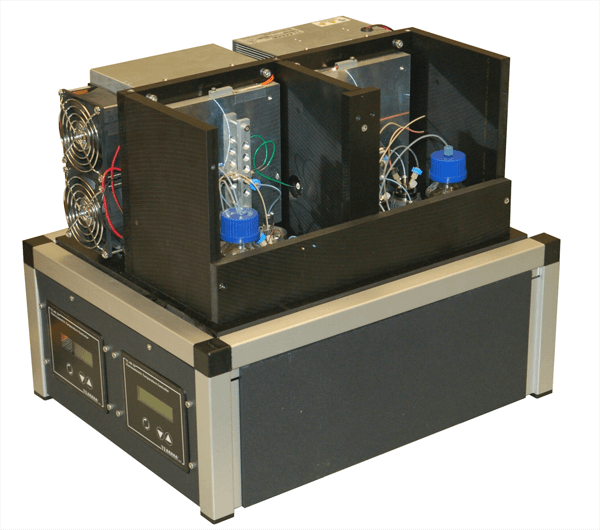
Our HDX Device 18"W x 14"D x15"T
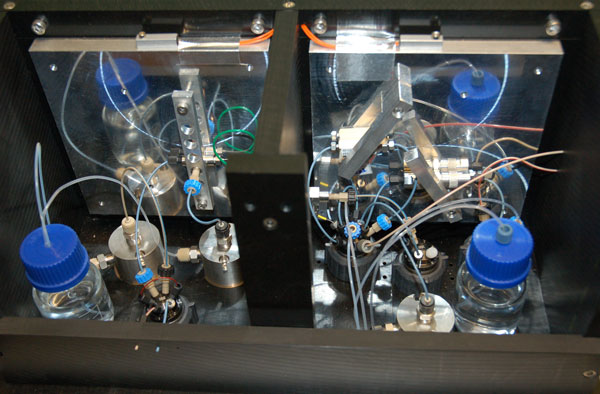
Internal workings of our HD Machine
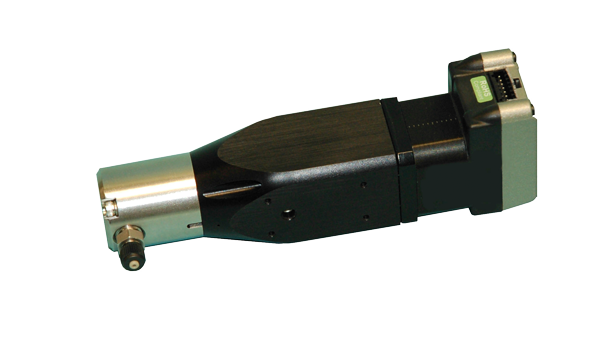
HPLC Pumps used in our system