
Scott Niemann
Agilent Chemstation Upgrades
Agilent Chemstation Upgrades
Data System Upgrades for HP Agilent Gas Chromatograph Mass Spectrometer.
CSS Analytical Eighty-X PX (c) for all of your Hewlett-Packard, HP and Agilent GC Mass Spectrometer Systems. Upgrade your old, out-of-support GC/MS system to a modern PC with Windows 7 (Windows XP Pro still available for now) and Modern Chemstation(c). Available for HP or Agilent 5971, 5972, 5973. Also avaialble for HP 5970, 5890, 6890, 5989 and 5988.
Here's how our upgrade package works:
The first Dos Windows based Chemstation came out in the early 1990s. Every time Microsoft rolled out a new Windows product, Hewlett-Packard ("HP" back then) would revise their Chemstation software. And on each major revision, they took the opportunity to remove support for older MS systems. This was their way of persuading you to "retire" your old mass spec system and buy a new one.
Since 1990 we have been studying and modifying the HP/Agilent Chemstation and every time they changed it - we'd put the support for old mass specs back in place. We've have had a very successful business for 20+ years. The "hacks" that we add to Chemstation are necessary for you to run your mass spec on Windows XP Pro are ours and can be found NO WHERE ELSE in the world (sole source justification). Over the years, some of our competitors copied our work but when we went to the XP upgrade we engaged an Anti Piracy Key and since then it has held up perfectly, keeping our IP safe. Our upgrade is distributed on our own installation CD ROM - making it a single CD, straight forward, EASY, and repeatable installation. When you use our software to "configure" your mass spec, you must provide a valid Chemstation license number. Our easy to install kit includes a compatible HPIB board for your PC, an installation CD ROM and easy to follow instructions.
In some (vary rare) cases, your GC-MSD may need newer boards. Contact us for details if you have a very old MSD.
Why make this investment ?
Upgrade your old, out-of-support GCMS systems to a modern PC with all the bells and whistles .... a DVD burner, Flash drive, modern Chemstation and Microsoft Windows 7. Have your older HP MSDs running on a screaming fast PC in less than an hour. Bring your perfectly good 10 to 15 year old mass spectrometer into the modern era and allow it to run another five to ten years. All for a fraction of the price of a new system.
Install the upgrade yourself or ask for on-site installation. Let us prepare a custom quote for you today !
Request more information here.
Available for HP 5971, 5972, 5973, 6890. Also for 5989, 5970 & 5988.
Chemstation(c) is a copyright of Agilent Technologies Inc.
Customer Update Page
Here is the software Update that you seek.
Find it at the very bottom of this page. The instructions for using this update is found immediately above the file link.
Notice for brand new customers: We usually give our new customers an Expiration date of only 5-6 weeks. This kind of encourages our new customers to stay in close contact. Then, after that initial time frame, we ALWAYS give our customers an extended expiration date (well beyond support of the instrument) at no charge.
Some customers purchase an upgrade but don't get around to installing the upgrade until after the initial expiration date expires. In this case follow these instructions:
Refer to the Installation Instructions that accompanied your upgrade kit. Follow the instructions as provided. When you come to Step 11 on Page 3............. STOP after using the CheckKey.exe program to verify that your key has been successfully installed. Note that since you waited to install the kit, your APK has expired.
NOW, download the appropriate Update program (as provided by CSS Analytical) and run the small .exe program as instructed. This will update your APK to a new expiration date. Use the CheckKey.exe program to see that the update was successful.
Continue with the Installation Instructions provided with the kit... commencing at the second portion of Step 11 on Page 3..... "Use the configuration program to configure your instrument.... "
Some users have encountered an unpleasant message from the CSS Anti Piracy Key when they reset their PC date back in time. Date tracking is an integral part of the Anti Piracy Key and caused their key to be disabled. If you experience this and want to get things running again, follow the procedure below:
1. Exit all software
2. Remove the Anti Piracy Key (APK) from the PC
3. Reboot PC
4. Set the computer date to the correct date
5. Reboot again
6. Plug the APK into the USB port, wait for the familiar "ding" that says a USB
device has been found
7. Run the "Update Program" again, the one you downloaded from the CSS web site.
Just double click on the program, it runs
almost instantly.
8. Run the program CheckKey.exe, a program located in the CSS Program Group
to verify that the APK is in place and has a proper date.
9. Start Chemstation again.
Occasionally we have received comments indicating that the customer's PC has all of a sudden decided NOT to recognize the APK ..... Even if the CSS Analytical CheckKey.exe program is able to recognize the key. This is a PC USB issue. USB is kind of fickle at times.
Follow these instructions to restore USB recognition of the APK:
1. Reboot, wait 5 min
2. Verify that the key is good using Checkkey.exe
3. Go to your PC Control Panel, then to Device Manager
4. Scroll down to find the entry for "USB Dongle – Software Protection Device"
5. Right Click and "Uninstall"
6. Remove the APK
7. Reboot, wait 5 min
8. Insert the APK into your USB port
9. Watch and listen (for the “dong”) for Windows XP to "Find New Hardware"
10. A dialog box will come up asking "if you can connect to windows update". SAY NO, then click next
11. Click on "Install Automatically" and then click next
12. After it is "finished" , use CheckKey.exe to verify that the APK is found again
13. Reboot one more time, wait 5 min
14. Start Chemstation and try again
Instructions for updating the Expiration Date on your Anti Piracy Key (APK):
Use the latest update program ONLY, unless told otherwise. After downloading this zip file, Un-zip its contents onto your desktop or temp folder. Take the .exe file to the PC running your instrument on a flash drive or by other suitable means.
Before using the update program use Check Key.exe (located in the CSS Program Group of your hard drive) to verify that your key is installed and validated.
Run the update program to extend the expiration date of your key, and then use Check Key.exe again to verify that it worked, and observe the new expiration date.
Contact us at sales@cssco.com if you need any further assistance or information.
Your current Update Program is Here:
Download this Zip file, copy it to your local hard drive, unzip it and follow the instructions above.
Then reboot and give it a try !
Mass Spec Technical Blog
Mass Spec Technical Blog
In order to bring all our years of Mass Spectrometer technical experience to our customers, we have started a technology blog. Current Blog Entries: Cleaning and Maintaining your 7673 Auto Sampler. Cleaning and Conditioning mass spectrometer o-rings. Unplanned interruption of a run or sequence. Back up power for your Benchtop Mass Spec.
Click here to find out what topics are covered and what is to come ...
Depot Repair Service
Depot Repair Service
Many customers are now taking advantage of our depot repair service. Send us your Mass Spectrometer, GC or LC (or significant portion) and we will diagnose your instrument at our shop, on one of our working instruments, then send you a quotation for the exact amount needed to repair your instrument.
Send us your MSD for repairs
We have found that it is often cheaper to repair the instrument by shipping it to us then it is to even step foot on-site at your location. A trip fee often costs as much as $4000 (air fare, rental car and travel labor) to visit your location.
We have shipped many HP 5972s for under $160 each way.
Our bench rate is $150 per hour to inspect and repair your instrument. We have all the parts needed to repair your instrument. Often times inspection labor is charged at zero if you proceed with the repair.
80x Owners Page
Repeller Assembly for 5971 5972
Replacement repeller assembly using the "5973" like repeller.
Your current "push in" type repeller cannot be easily removed and cleaned. Often when you try to punch the repeller out of its insulator you damage the aluminum mount. Replace your existing 5971 & 5972 repeller assembly with our removable repeller using a 5973 repeller, two insulators a washer and nut. JUST LIKE THE 5973. Currently priced at $500 . Get yours now !
Cleaner source = better sensitivity !
Let us help you keep your 5971 and 5972 running another 5+ years.
NIST 14 Mass Spectral Library and Search Program
"Dollar for dollar, this is the most complete and useful library and search program available."
Main Library
276,248 Spectra
MS/MS Library
234,284 Spectra of 45,298 ions
Retention Index Library
346,757 entries including complete GC Method with literature citation. RI values for 82,868 compounds. 56,216 compounds in the Main Library have RI data.
Evaluation and Quality Control
Each spectrum critically examined by experienced mass spectrometrists.
Each chemical structure examined for correctness and consistency, using both human and computer methods.
Spectra of all stereoisomers intercompared.
Chemical names examined by experts and IUPAC names provided.
Thousands of replacements of spectra with higher quality spectra.
Verified CAS registry numbers.
Main new features of the NIST MS Search Program version 2.2g
-
New NIST 14 MS/MS Library. Spectra include metabolites, peptides (biologically active peptides and all di-peptides and tryptic tri-peptides), contaminants, lipids and more.
-
Using Retention Index in library searching: RI deviation of a hit from the search spectrum are used to penalize the Match Factor.
-
Indexing older user libraries to use saved in them RI values for library searching
-
Displaying relevant RI values in the hit list
-
New definitions of derivatives are used for finding replicate spectra
-
Displaying derivative precursor in the Lib. Search hit list
-
Displaying additional MS/MS information in hit lists
-
Search for exact precursor mass in mass spectral libraries.
System Requirements: PC with Microsoft® Windows NT® 4.0, Windows® 2000, Windows® XP, Windows Vista®,or Windows® 7,8,8.1; hard disk with 1.5GB of available space required.
PC Upgrade Bundles
CSS Analytical Eighty-X PX (c) Data System Upgrades require a modern compatible Personal Computer.
We are pleased to offer you a new PC with all the bells and whistles ... 500 MB Hard Drive, 2 GB Ram, DVD burner, Lots of USB ports, and licensed Microsoft Windows 7 (XP Pro still available). Our PC does not include keyboard, mouse, monitor or printer (available separately). Price of our bundle is normally around $900 but we can custom build the exact PC of your choice. Contact us for details.
Let us prepare a custom quote for you today !
Available for all our upgrade products: HP 5970, 5971, 5972, 5973, 5988, 5989.
1100 LCMSD Upgrades
Upgrade your Hewlett-Packard 1100 LCMSD and 1100 LCMSD Ion Trap systems to a modern PC and Microsoft Windows (XP Pro and Windows 7).
Upgrades for your 1100 LCMSD
Our hardware upgrade kits include "A" to "B" upgrades, "B" or "C" to "D" upgrades. Contact us directly for a quote.
Have your older HP MSD running on a screaming fast PC in less than a couple of hours. Bring your perfectly good 10 to 15 year old mass spectrometer into the modern era and allow it to run another five to ten years. Provide your own compatible PC or buy one of our bundles. Let us prepare a custom quote for you today !


6890 Lan Upgrade
6890 Lan Upgrade
CSS Analytical Eighty-X PX (c) Bare Bones Lan Upgrades for your HP Agilent 6890 GC Systems..
Upgrade your 6890 GC systems to a modern PC with full network connectivity and the very latest Agilent Chemstation.
History of the 6890 GC System:
First there was the 6890A. In the early days, the 6890s were still under the HPIB protocol. That meant that the old tried-and true HPIB boards and cables were an integral part of the system. HPIB was rather difficult to install but once in place was always ROCK SOLID ! This of course required an HPIB board in your PC, and an HPIB board in your GC and Autosampler.
When networking became common in the office, it naturally extended itself to the Analytical Laboratory. For much of the same reasons that "network printers" became popular - so did "network instruments". Here were the factors that drove the change: Ease of set up and a common environment (IT personnel with Lan experience are easy to find... HPIB experience not so easy to find). Communication by Ethernet is much faster and reliable. Lan instruments can be MUCH FURTHER away from the PC. How many labs have instruments on one bench, but the PC on another bench across the isle or across the room ? Ethernet made that EASY ! Ethernet cables are much easier to route and much neater. Then there is the dream of WEB BASED instruments. Not such a dream any more. With the proper software and permission - I can run your instrument from far, far away (individual runs and sequences). I can connect to your instrument and help you troubleshoot any issues you may have. And even run remote diagnostics and fix your instrument over the web.
With the advent of the 6890N ("N" stands for network) GCs became LAN instruments. The PC and the GC came with Ethernet cards inside and included a Hub and Cat 5 cable.
Here's how we do the Upgrade:
We basically put a Lan card and related hardware into your GC. We advise you how to configure your Network card inside your PC, help you load new Chemstation software and make connections via a hub and Cat-5 cable. Easy !
Why make this investment through CSS Analytical ?
Why ? You can get the same upgrade from us (using HP/Agilent parts) cheaper from us !
Any time Agilent puts together a kit, the cost goes UP, UP, UP ! We buy the same parts individually and put together our own kit. Since we don't have the same overhead as Agilent, we can keep the prices lower.
Upgrade your 6890 GC systems to a modern PC with full network connectivity, a DVD burner, Flash drive, Windows XP Pro or Windows 7 and the very latest Chemstation. Do it now while these parts are still available !
Our easy to install kit includes a Lan card for the 6890 GC, Hub, Cat-5 Cables and easy to follow instructions. Have your older HPIB based 6890 running on a screaming fast PC in less than a couple of hours. Do it now for a price that is HALF of the alternative package. Bring your perfectly good 5+ year old GC into the modern era and allow it to run another ten to fifteen years.
Available for HP and Agilent 6890 currently running under the HPIB protocol.
Provide your own compatible PC or buy one of our bundles. Install the upgrade yourself or ask for on-site installation. Let us prepare a custom quote for you today ! k
Chemstation(c) is a copyright of Agilent Technologies Inc.
HDX Images
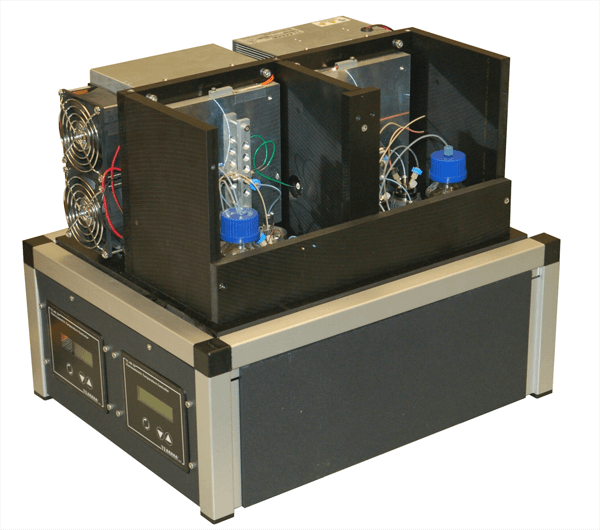
Our HDX Device 18"W x 14"D x15"T
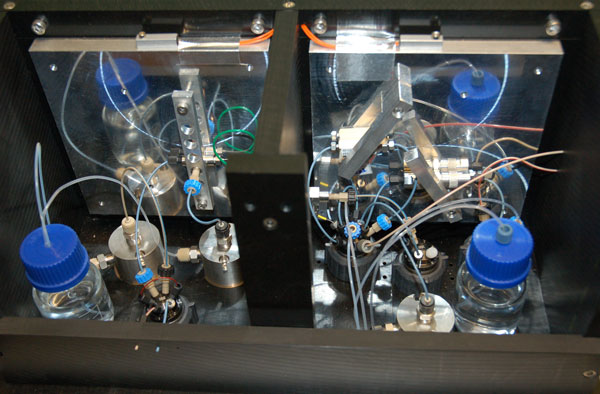
Internal workings of our HD Machine
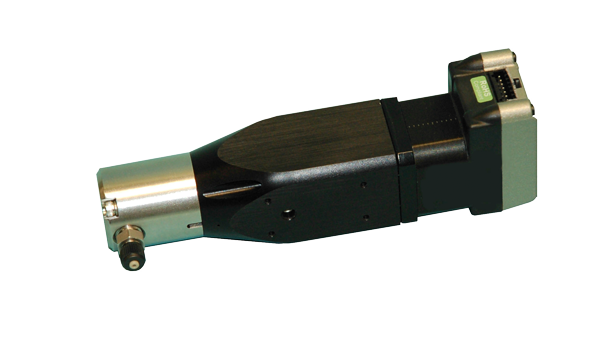
HPLC Pumps used in our system